Only sort by basic SKU or Courier. Multi-quantity orders get mixed up with single orders, causing warehouse confusion and packing errors.
✅ EcomSaathi Label Sorter (Our Superpower)
We intelligently scan for Color, Size, and Quantity. We automatically separate single-item orders from multi-quantity orders so your packing team never makes a mistake.
How it Works
1
Upload
Drop your raw, uncropped PDF straight from the seller panel.
2
Auto-Sort
Our AI reads the text, crops to 4x6, and groups by color/quantity.
3
Print
Download the optimized PDF and print instantly on any thermal printer.
📄 Save 70% Paper
Print 4 labels per A4 sheet or perfect 4x6 thermal cuts.
🎯 Zero Barcode Fails
100% clear QR codes to prevent courier rejection.
📊 No Excel Needed
Pure PDF in, perfect PDF out. No manual data entry.
⚡ Browser-Based
Works instantly, no heavy software to install.
Frequently Asked Questions
How do I crop Amazon Easy Ship labels for a 4x6 thermal printer?
Upload your Amazon Seller Central shipping PDF to EcomSaathi's Label Sorter. Our tool automatically crops each A4 label to a perfect 4x6 inch thermal format. Works with TSC, Zebra, and Xprinter printers. 100% free, no login required.
Can I sort Amazon orders by color and product before printing?
Yes! After uploading, our Label Sorter lets you sort by Product/SKU, Color, Size, Quantity, Courier, Pincode, or COD/Prepaid. This eliminates packing errors and speeds up warehouse operations for Amazon sellers.
Is my customer data safe when using this Amazon label tool?
Absolutely. Your PDF files are processed entirely inside your own browser. No data is ever uploaded to our servers, ensuring total privacy for your Amazon customer information.
बार-बार पूछे जाने वाले प्रश्न (FAQ - Hindi)
अमेज़न इजी शिप (Amazon Easy Ship) लेबल को 4x6 आकार में कैसे क्रॉप करें?
अमेज़न सेलर सेंट्रल से डाउनलोड की गई पीडीएफ को यहाँ ड्रैग और ड्रॉप करें। टूल स्वचालित रूप से इसे 4x6 फॉर्मेट में क्रॉप कर देगा जिसे आप टीएससी (TSC) या ज़ेबरा (Zebra) प्रिंटर पर प्रिंट कर सकते हैं।
क्या मैं अमेज़न ऑर्डर को कलर (Color) और प्रोडक्ट के आधार पर सॉर्ट कर सकता हूँ?
हां! अपलोड करने के बाद आप SKU, प्रोडक्ट कलर, साइज और पेमेंट मोड (COD/Prepaid) के अनुसार सॉर्ट कर सकते हैं ताकि पैकिंग करते समय कोई गलती न हो।
Free Amazon Label Sorter & Crop Tool
Sorting and cropping Amazon shipping labels manually takes hours. EcomSaathi is the best Amazon label crop tool available for Indian sellers. Simply upload your PDF, and our browser-based tool will organize all your orders by SKU, color, or quantity in seconds.
Whether you are using a TSC, Zebra, or any standard thermal printer, this tool perfectly formats every label to 4x6 inches, eliminating blurry barcodes and courier rejections. Best of all, your PDFs are processed entirely on your own device—guaranteeing 100% privacy for your customer data. Stop wasting paper and time, and start using the ultimate free utility for your e-commerce warehouse operations.
Frequently Asked Questions
How do I crop Amazon Easy Ship labels for a 4x6 thermal printer?
Upload your Amazon Seller Central shipping PDF to EcomSaathi's Label Sorter. Our tool automatically crops each A4 label to a perfect 4x6 inch thermal format. Works with TSC, Zebra, and Xprinter. 100% free, no login.
Can I sort Amazon orders by color and product before printing?
Yes! After uploading, our Label Sorter lets you sort by Product/SKU, Color, Size, Quantity, Courier, Pincode, or COD/Prepaid. This eliminates packing errors and speeds up warehouse operations.
Amazon फाइल: बार-बार पूछे जाने वाले प्रश्न (Hindi FAQ)
क्या मैं Amazon फाइल (Label PDF) को मोबाइल से क्रॉप कर सकता हूँ?
हाँ, EcomSaathi का लेबल सॉर्टर मोबाइल और कंप्यूटर दोनों पर अच्छे से काम करता है। बस अपनी Amazon फाइल अपलोड करें और 4x6 साइज में डाउनलोड करें।
क्या Amazon लेबल क्रॉप करने के लिए कोई फीस है?
बिल्कुल नहीं। यह टूल भारतीय ई-कॉमर्स सेलर्स के लिए 100% मुफ्त है। आप जितने चाहें उतने लेबल क्रॉप और सॉर्ट कर सकते हैं।
Amazon Label Crop 4x6: Streamline Your Easy Ship Dispatch
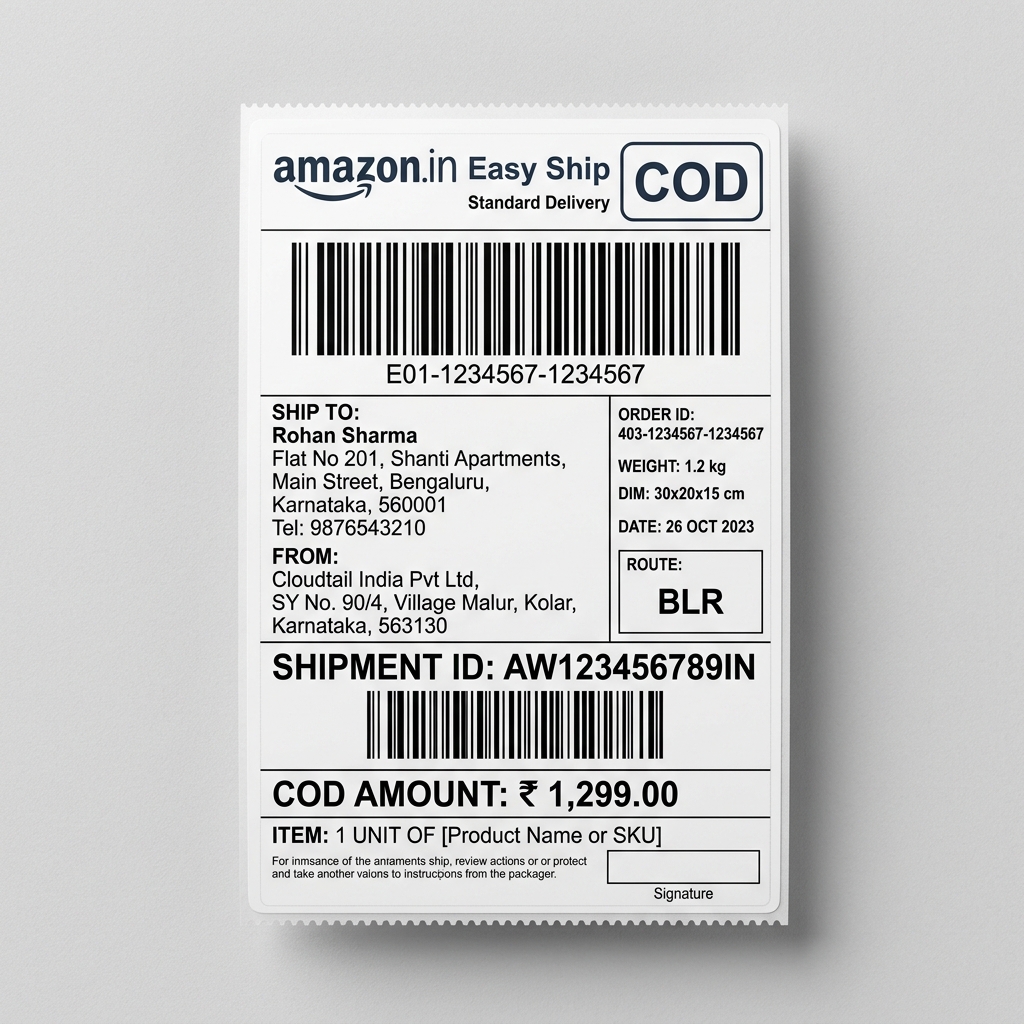
Managing Amazon Easy Ship orders efficiently is critical for maintaining your seller metrics and ensuring rapid delivery to customers. When you download your shipping labels from Amazon Seller Central, they often come in an A4 PDF format that includes extra margins, instructions, and sometimes packing slips. Trying to print these directly onto a 4x6 thermal printer results in shrunken barcodes that Amazon pickup agents simply cannot scan. An Amazon label crop tool is the missing link in your warehouse operations.
With EcomSaathi's free browser-based utility, converting your Amazon labels for thermal printing is effortless. Simply drag and drop your bulk order PDF into our platform. The tool automatically identifies the shipping label boundaries within the Amazon format, strips away the unnecessary A4 margins, and perfectly centers the label for a 4x6 inch (100mm x 150mm) output. This guarantees that every barcode, AWB number, and customer address is printed at maximum resolution and contrast, perfectly suited for standard TSC, Zebra, and TVS thermal printers.
But cropping is only half the battle. EcomSaathi empowers Amazon sellers with advanced sorting features to optimize the picking and packing workflow. You can sort your generated labels by Product SKU, specific item attributes like Color and Size, or even by Courier partner and Pincode. By grouping similar products together, your warehouse staff can pack orders in batches. This batch-packing method has been proven to reduce packing mistakes by up to 70%, ensuring that your customers receive exactly what they ordered, thereby protecting your vital Amazon seller rating.
Security and privacy are at the core of our platform. We understand that your Amazon shipping labels contain sensitive customer information, including names, addresses, and contact details. That is why our tool operates entirely on the client-side. Your PDFs are processed locally on your own machine—no data is ever uploaded or stored on external servers. Enjoy peace of mind, unparalleled speed, and perfect 4x6 Amazon labels without paying a single rupee. EcomSaathi is the ultimate free tool designed specifically for the high-volume Indian Amazon seller.