
Free Meesho Profit & Loss Calculator
Upload your Meesho Previous Payment Excel sheet (ZIP or XLSX) to analyze your true profit, revenues, deductions, and ads cost.
Upload Meesho Payout Settlements
Select or drag your "Previous Payment" ZIP, XLSX, or CSV file.
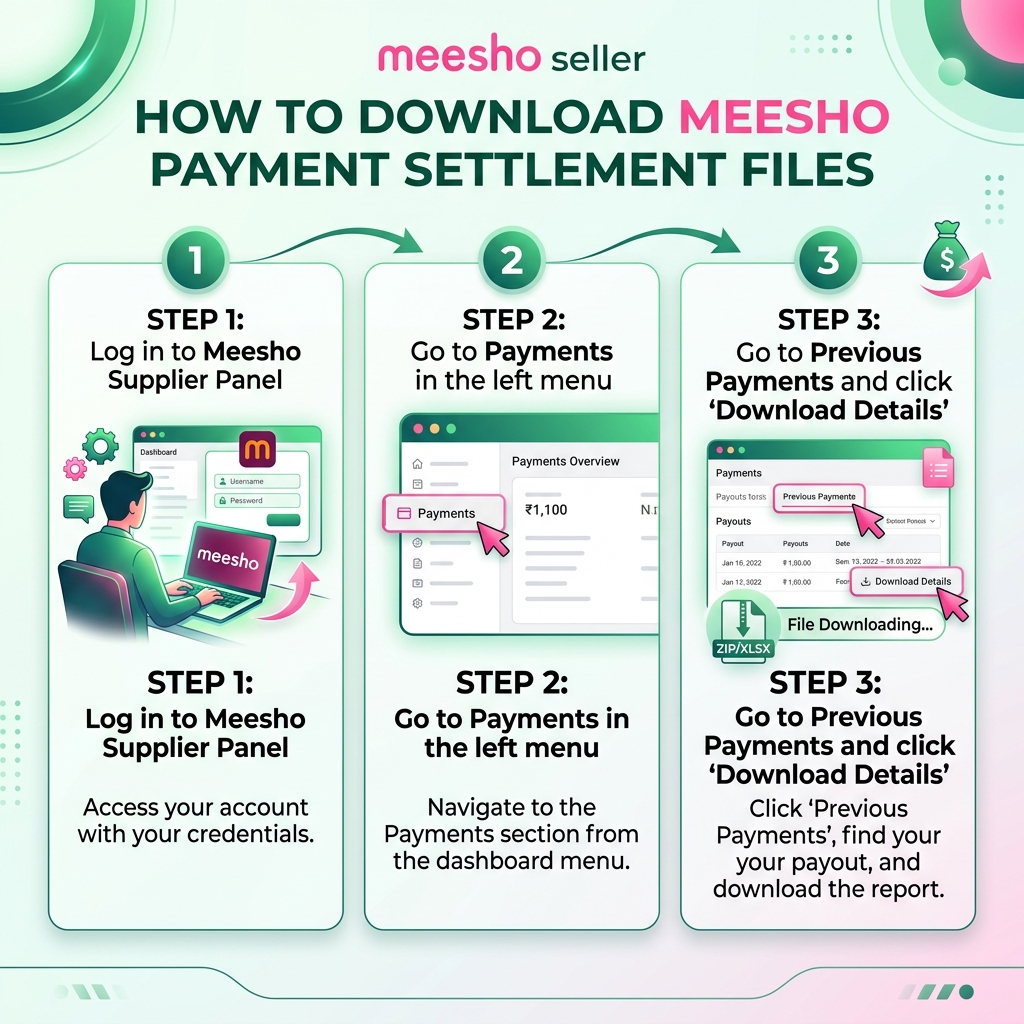
📖 Quick Guide: How to download file
Log in to Meesho Supplier Panel, click Payments on the left menu.
Open Previous Payments tab from top menu bar.
Click Download Details next to any date. Upload that ZIP file here.
Meesho Profit Calculation: Margin Calculate Karne Ka Tarika
Meesho supplier panel features zero commission, but many sellers still lose money due to return charges (RTO and DTO customer returns), shipping penalties, and advertisements costs. Understanding your actual net settlement is crucial for survival. If you are asking "Meesho me profit margin kaise nikale?" or "Meesho profit calculation kaise kare?", this free online tool is built exactly for you.
Unlike generic pricing calculators where you manually input estimated numbers, EcomSaathi acts as a complete Meesho settlement audit tool. Simply do a Meesho profit loss calculator upload with your raw payment files, and our system parses your actual settlement sheets directly. This gives you exact data matching the bank transfer details, allowing you to audit your business with 100% accuracy.
Manual Input Calculator: Set the Right Price (Pre-Listing)
Before uploading products, you must calculate the right selling price to ensure profitability. Use the formula below to manually calculate your expected Meesho profit margin:
Expected Profit = Selling Price - (Sourcing Cost + Shipping Cost + Expected RTO Loss)
- Selling Price: The price listed on Meesho.
- Sourcing Cost: Manufacturing/Wholesale cost + Packaging material cost.
- Shipping Cost: Around ₹40-70 depending on weight (below 500g).
- Expected RTO Loss: Add an extra 10-15% buffer on your cost price to absorb return shipping fees.
Meesho Commission Table (Updated 2026)
Meesho is famous for its "Zero Commission" model. However, sellers must still account for GST, TCS (Tax Collected at Source), TDS (Tax Deducted at Source), and Shipping rates. Here is the updated breakdown for 2026:
| Fee Component | Rate / Deduction |
|---|---|
| Platform Commission | 0% |
| TCS (Tax Collected at Source) | 1% of Taxable Value |
| TDS (Tax Deducted at Source) | 1% (Section 194O) |
| Forward Shipping (Local) | Starts at ₹43 for up to 500g |
| Reverse Shipping (RTO) | ₹60 - ₹80 per return (Penalty) |
The Silent Profit Killer: RTO (Return to Origin) Explanation
The biggest shock for new Meesho sellers is the RTO (Return to Origin) penalty. An RTO occurs when a customer rejects a Cash on Delivery (COD) order at their doorstep.
While Meesho does not charge a forward shipping fee to the seller when the order is successfully delivered, they will charge a reverse shipping fee (usually ₹60-120 depending on weight) if the order is RTO'd. If your average RTO rate is 15-20%, these ₹60 penalties quickly eat up all your profits from the 80% successfully delivered orders.
How our tool helps:When you upload your "Previous Payments" sheet, our calculator aggregates all "Return Shipping Charge" recoveries. It isolates your RTO losses so you can see exactly how much money is bleeding from your account due to rejected COD orders.
📦 1. Product Cost (COGS)
Your Cost of Goods Sold (COGS) is the total manufacturing or purchasing cost of the item, including packaging materials, labels, and warehouse labor. Enter this value into the calculator after uploading your sheets to immediately calculate your true net profit.
🔄 2. Return & RTO Penalties
Returns are the biggest profit killer on Meesho. Customer returns (DTO) result in reverse shipping charges, while Return to Origin (RTO) has forward shipping deductions. Our tool audits return ratios and quantifies the exact rupee amount lost to returns.
📢 3. Platform Ads Recovery
Meesho deducts advertising costs directly from your payouts. Often, sellers do not realize how much they spend on ads until they check their bank statement. Our auditor aggregates all ad recovery line items to show your true return on ad spend (ROAS).
Meesho me Profit Margin Calculate Kaise Kare? (Step-by-Step Guide)
- Download Settlement File: Log into the Meesho Supplier Panel. Navigate to Payments → Previous Payments and download the settlement files (Excel sheets) for the desired period.
- Upload to EcomSaathi: Drag and drop the downloaded ZIP or XLSX file directly into the upload area above. You can upload multiple files at once to audit multiple months.
- Input Product Cost (COGS): Enter your average cost price per product. Our calculator will immediately subtract this from the net settlement.
- Analyze the Bottom Line: View your aggregated orders, RTO rates, customer returns, ads cost, and final True Net Profit.
मीशो सेलर प्रॉफिट और लॉस कैलकुलेटर (Meesho Margin Calculator in Hindi)
क्या आप मीशो पर अपनी सही कमाई (Actual Net Profit) जानना चाहते हैं? कई बार मीशो पैनल पर दिखाए जाने वाले ऑर्डर्स और बैंक खाते में आने वाले पैसों में अंतर होता है। ऐसा इसलिए होता है क्योंकि मीशो आपके पेआउट से शिपिंग चार्ज, रिटर्न पेनल्टी (RTO Charges), और एडवरटाइजिंग कॉस्ट (Ads Cost) काट लेता है।
EcomSaathi का Free Meesho Profit Loss Calculator इन सब कैलकुलेशन को आसान बनाता है:
- पूरी तरह से सुरक्षित (100% Client-Side Privacy): आपकी एक्सेल शीट का कोई भी डेटा हमारे सर्वर पर अपलोड नहीं होता है। सारा काम आपके कंप्यूटर में ही होता है।
- RTO और रिटर्न का नुकसान: यह कैलकुलेटर आपको दिखाता है कि कस्टमर रिटर्न और RTO के कारण आपको कुल कितने रुपये का नुकसान हुआ।
- सच्चा बैंक ट्रांसफर पेआउट: आपके खाते में आने वाले कुल पैसे और आपके प्रोडक्ट कॉस्ट को घटाकर यह आपका बिल्कुल True Net Profit दिखाता है।
Frequently Asked Questions / बार-बार पूछे जाने वाले प्रश्न
How do I open and read a Meesho Previous Payments ZIP file?
You can open and parse it instantly without extracting it by using EcomSaathi's free online settlement calculator. Just drag and drop the ZIP file directly into the tool to audit DTO return charges, ad recoveries, and net profits.
Why are Meesho payment settlement values different from order prices?
Meesho deducts return shipping charges for DTO/RTO orders, advertising costs, and TCS/TDS taxes from your settlement payouts. Our calculator audits these specific recoveries to show your true bank transfer payout.
Is this Meesho Profit Calculator 100% free to use?
Yes, all seller tools on EcomSaathi are completely free. You can upload files and perform profit calculation as many times as you want without any charge or registration required.
Is my sales and pricing data safe with EcomSaathi?
Absolutely. Your privacy is our highest priority. All file parsing and margin calculations occur directly inside your web browser using client-side JavaScript. Your file data never leaves your device and is never sent to any server.
Meesho Previous Payments sheet me RTO charge kaise check kare?
When you download the "Previous Payments" Excel sheet from the Meesho Supplier Panel, it contains columns for "Return Shipping Charge" and "Compensation". Calculating these manually is extremely tedious. Our tool parses these columns automatically to show your total return costs and net bank transfer.
क्या मैं मोबाइल पर मीशो का प्रॉफिट कैलकुलेट कर सकता हूँ?
हाँ, यह टूल पूरी तरह से मोबाइल-फ्रेंडली है। आप अपने स्मार्टफोन से भी मीशो पेमेंट्स की ज़िप (ZIP) फाइल या एक्सेल शीट को यहाँ अपलोड करके तुरंत अपनी असल प्रॉफिट मार्जिन (True Profit Margin) चेक कर सकते हैं।