Free Flipkart Label Cropper & Sorter — Remove Invoice, Sort by SKU & Color
Automatically crop Flipkart A4 shipping labels to 4x6 thermal format, remove tax invoices, and sort by SKU, color, size, or quantity. Works with TSC, Zebra & Xprinter. 100% free, no login.
Upload your label PDFs
You can upload multiple PDF files to sort them all together in a single print batch!
Drop your PDFs here
or click to browse files
Supports Meesho, Flipkart & Amazon labels (multi-file support)
Why Our Label Sorter is the Best Free Flipkart Label Cropper
❌ Other Tools
Basic Flipkart label croppers only cut the page. They cannot remove invoices cleanly, cannot sort by SKU or color, and multi-quantity orders get mixed up with single orders — causing warehouse chaos and wrong shipments.
✅ EcomSaathi Label Sorter (Our Superpower)
We automatically remove Flipkart tax invoices, crop labels to perfect 4x6 thermal format, and intelligently sort by SKU, Color, Size, Quantity, Courier, and COD/Prepaid. Multi-quantity orders are automatically separated so your packing team never ships the wrong product.
How it Works
Upload
Drop your raw, uncropped PDF straight from the seller panel.
Auto-Sort
Our AI reads the text, crops to 4x6, and groups by color/quantity.
Download the optimized PDF and print instantly on any thermal printer.
📄 Save 70% Paper
Print 4 labels per A4 sheet or perfect 4x6 thermal cuts.
🎯 Zero Barcode Fails
100% clear QR codes to prevent courier rejection.
📊 No Excel Needed
Pure PDF in, perfect PDF out. No manual data entry.
⚡ Browser-Based
Works instantly, no heavy software to install.
Frequently Asked Questions
How do I crop Flipkart shipping labels for a 4x6 thermal printer for free?
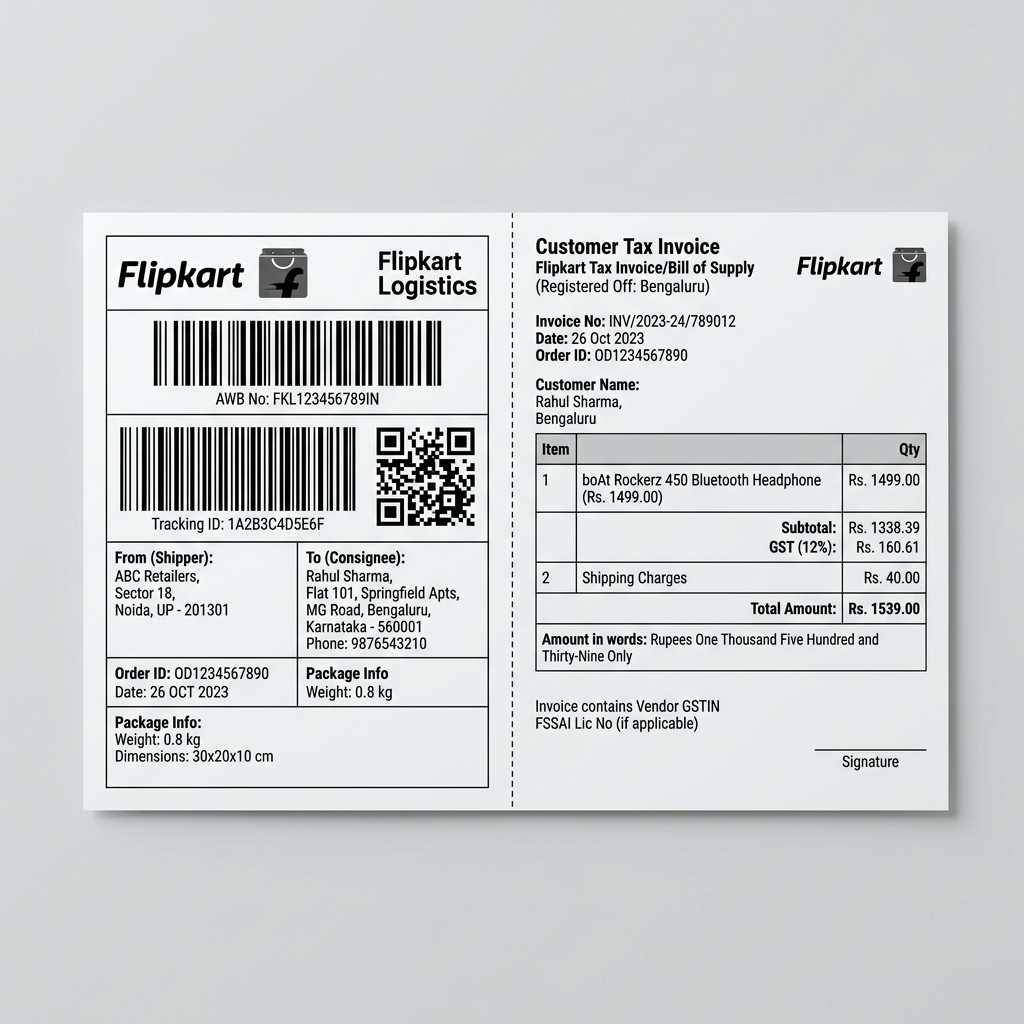
Upload your Flipkart Seller Hub PDF to EcomSaathi's Label Sorter. Our tool automatically detects the horizontal split layout, removes the tax invoice section, and crops each shipping label to a perfect 4x6 inch format ready for TSC, Zebra, or Xprinter thermal printers. It is 100% free — no login, no signup.
Can this tool remove invoices from Flipkart shipping labels automatically?
Yes! Flipkart PDFs often combine the shipping label and GST tax invoice on the same page in a horizontal layout. Our Label Sorter's AI automatically detects and separates them. You get a clean PDF with only the shipping labels, perfectly cropped for thermal printing. No more manual cutting with scissors.
How do I sort Flipkart orders by SKU, color, or size before printing?
After uploading your Flipkart PDF, our Label Sorter reads each label's product details and lets you sort by 7 different criteria: SKU/Product, Color, Size, Quantity, Courier, Pincode, or Payment Mode (COD/Prepaid). This makes warehouse picking and packing 10x faster and eliminates mixed-up orders.
Is this Flipkart label cropper safe for my customer data?
Absolutely. EcomSaathi's Label Sorter is a 100% client-side, browser-based tool. Your PDF is processed entirely inside your own browser using JavaScript. No files are ever uploaded to our servers. Your customer phone numbers, addresses, and order data remain completely private on your device.
Does this tool work for Flipkart FBF (Fulfilled by Flipkart) labels?
Yes, our Label Sorter supports all Flipkart label formats including standard Seller Hub labels and FBF (Fulfilled by Flipkart) shipping labels. The tool auto-detects the layout and crops accordingly. It also works for Flipkart Smart Fulfillment labels.
What print settings should I use for Flipkart labels on a thermal printer?
After cropping with our Label Sorter, use these settings for best results: Scale: 100% (Actual Size), Fit to Page: OFF, Margins: 0, Media Size: 4x6 inches (100mm × 150mm). Set your TSC or Zebra printer darkness/density to High for crystal-clear barcodes that couriers will always accept.
Can I crop Flipkart labels in bulk for 500+ orders?
Yes! Our Label Sorter handles bulk PDFs with hundreds of pages. Simply download all your Flipkart Seller Hub orders as a single PDF and upload it. The tool will crop, remove invoices, and sort all labels in seconds — even on a low-end mobile phone.
बार-बार पूछे जाने वाले प्रश्न (FAQ - Hindi)
फ्लिपकार्ट (Flipkart) शिपिंग लेबल को 4x6 थर्मल प्रिंटर के लिए मुफ्त में कैसे क्रॉप करें?
अपना फ्लिपकार्ट पीडीएफ लेबल यहाँ अपलोड करें। हमारा टूल टैक्स इनवॉइस को हटाकर केवल शिपिंग लेबल को 4x6 फॉर्मेट में क्रॉप कर देगा। यह 100% मुफ्त है और इसके लिए कोई लॉगिन की आवश्यकता नहीं है।
क्या यह टूल फ्लिपकार्ट लेबल से टैक्स इनवॉइस को हटा सकता है?
हाँ! फ्लिपकार्ट पीडीएफ में शिपिंग लेबल और टैक्स इनवॉइस एक साथ होते हैं। हमारा टूल इनवॉइस को हटाकर आपको साफ शिपिंग लेबल देता है, ताकि आप थर्मल प्रिंटर पर आसानी से स्टिकर प्रिंट कर सकें।
क्या इस टूल में मेरे ग्राहकों का डेटा सुरक्षित है?
हाँ, बिल्कुल। आपका पीडीएफ फाइल केवल आपके ब्राउज़र के अंदर ही प्रोसेस होता है। कोई भी फ़ाइल हमारे सर्वर पर अपलोड नहीं की जाती है, जिससे आपका डेटा 100% सुरक्षित रहता रहता है।